
Choosing the right cloud storage solution can be a daunting task, given the multitude of options available. From personal use cases like storing photos and videos to business needs such as file sharing and collaboration, understanding your specific requirements is paramount. This article will guide you through the crucial factors to consider when selecting a cloud storage provider, ensuring you make an informed decision that aligns with your needs and budget. We’ll explore key features like storage capacity, security measures, synchronization options, and pricing models, enabling you to effectively compare and contrast various cloud storage services.
Navigating the cloud storage landscape requires careful evaluation of different providers and their offerings. Whether you’re an individual seeking a secure place for personal files or a business requiring a robust platform for data management, making the right choice is essential. By understanding the nuances of cloud storage solutions, including their strengths and limitations, you can optimize your investment and ensure your data is safe, accessible, and managed efficiently. This guide will empower you to choose the best cloud storage option that fits your specific requirements, whether that be Google Drive, Dropbox, OneDrive, or another emerging cloud storage platform.
Identifying Your Storage Needs
Before diving into the myriad of cloud storage options, it’s crucial to assess your specific storage requirements. Understanding your needs will guide you toward the most suitable and cost-effective solution.
Consider the following factors:
- Storage Capacity: How much storage space do you need? Estimate your current and projected future needs.
- File Types: What types of files will you be storing (e.g., documents, images, videos)? Different file types may have different storage requirements.
- Frequency of Access: How often will you need to access the stored files? This impacts the choice between hot and cold storage.
- Number of Users: Will multiple users need access to the storage? Consider collaboration features and user permissions.
Comparing Cloud Storage Options
Choosing the right cloud storage involves comparing various providers and their offerings. Key factors include storage capacity, security features, synchronization capabilities, and pricing. Each provider offers different plans with varying levels of service, making direct comparison crucial.
A simple comparison table can help clarify these differences. Consider listing providers, their storage tiers, prices, security features (like encryption and two-factor authentication), and platform compatibility (Windows, macOS, iOS, Android). This will allow you to quickly see which option best suits your needs and budget.
Security and Compliance Features

Security is paramount when selecting a cloud storage solution. Look for features like encryption (both in transit and at rest), access controls, and multi-factor authentication.
Compliance requirements vary depending on your industry and location. Ensure the provider meets relevant standards such as HIPAA, GDPR, or PCI DSS if applicable. Verify their certifications and audit reports.
Consider data retention policies and data recovery options. Understand how the provider handles data deletion and what guarantees they offer regarding data availability and business continuity.
Pricing Models and Flexibility
Cloud storage providers offer various pricing models, understanding them is crucial for cost optimization. Common models include pay-as-you-go, where you pay only for the storage used, tiered pricing, offering lower costs for larger volumes, and subscription plans with fixed monthly or annual fees.
Flexibility is another key factor. Consider whether the provider allows easy scalability, data migration options, and integration with other services your business utilizes. Look for options to adjust storage capacity based on fluctuating needs to avoid overpaying for unused space.
Backup and Recovery Capabilities
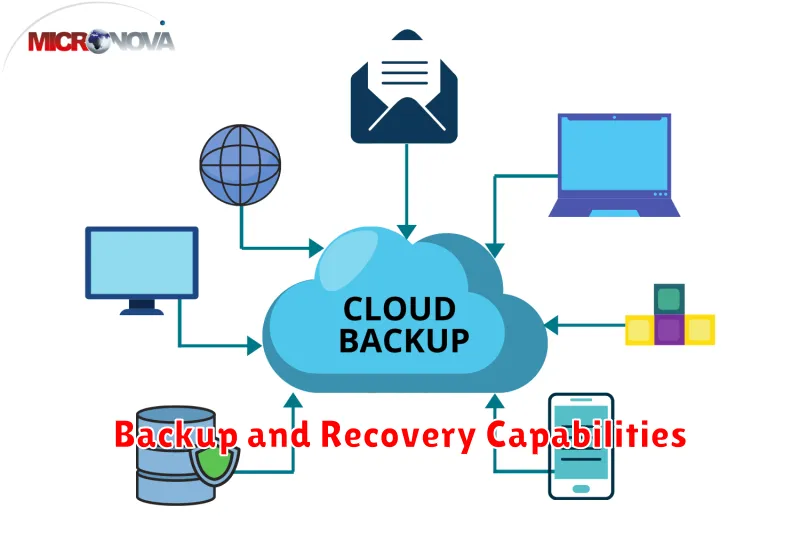
A crucial aspect of cloud storage is its backup and recovery capabilities. Ensure the solution offers automated backups and allows you to define the backup frequency. Look for features like incremental backups to optimize storage space and bandwidth usage.
Recovery options are equally important. The solution should provide different recovery point objectives (RPOs) and recovery time objectives (RTOs) to meet your specific needs. Consider whether you need point-in-time recovery, which allows restoring data to a specific moment in time.
Verify the ease of recovery. A straightforward recovery process minimizes downtime and simplifies disaster recovery scenarios. Test the recovery process thoroughly to ensure it aligns with your expectations and business requirements.
Access Control and User Management
Access control features are crucial for securing your data in the cloud. Consider granular permissions, allowing you to define who can access specific files and folders, and what actions they can perform (read, write, delete). Look for solutions offering role-based access control (RBAC) to simplify management, especially for larger teams.
User management capabilities streamline administration. Features like user provisioning, de-provisioning, and group management are essential, particularly if you have a dynamic workforce. Consider the integration options with existing directory services (e.g., Active Directory, LDAP) to centralize user management and simplify onboarding/offboarding processes.
Integration with Other Services
Seamless integration with other services is a crucial factor when selecting a cloud storage solution. Consider how well the service integrates with your existing workflow and other applications you frequently use.
Think about your productivity applications, such as email clients, document editors, and project management software. Does the cloud storage solution offer direct integration, allowing you to easily save and access files directly from these applications?
Also, consider integrations with other cloud-based services. This could include platforms for analytics, data processing, or machine learning. Compatibility with these services can significantly enhance the value and utility of your chosen cloud storage solution.
