
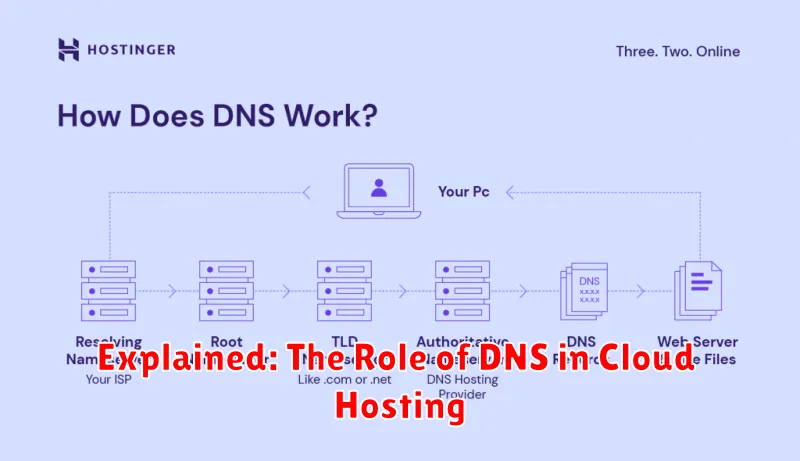
In the realm of cloud hosting, the Domain Name System (DNS) plays a critical role. Understanding how DNS functions is essential for anyone utilizing cloud hosting services. This article will delve into the intricacies of DNS, explaining its vital function in connecting users to websites and applications hosted on the cloud. We will explore how DNS resolution works, its impact on website performance, and why it’s a cornerstone of the cloud hosting infrastructure.
From translating human-readable domain names like example.com to machine-readable IP addresses, DNS acts as the internet’s phone book. This seemingly simple process is the foundation upon which all cloud-hosted websites and applications are accessible. Without a robust and efficient DNS infrastructure, connecting to cloud-hosted resources would be a complex and cumbersome task. This introductory exploration will clarify the importance of DNS in the context of cloud hosting, highlighting its significance for both website owners and users alike.
What Is DNS and How It Works
The Domain Name System (DNS) is the internet’s phonebook. It translates human-readable domain names (like example.com) into machine-readable IP addresses (like 192.0.2.1) that computers use to communicate. This is essential because computers rely on numerical IP addresses to locate and connect to websites and other online resources.
When you type a domain name into your browser, your computer contacts a DNS server. The DNS server then looks up the corresponding IP address. If it finds a match, it returns the IP address to your computer, allowing it to connect to the desired server. This process happens behind the scenes, usually in milliseconds, making browsing the web seamless.
DNS in Traditional vs Cloud Hosting
In traditional hosting, DNS management is typically handled directly by the hosting provider. Your domain’s DNS records reside on their nameservers, and any changes are made through their control panel. This often means a simpler setup process, but less flexibility and control.
Cloud hosting offers more diverse DNS management options. While some providers offer similar DNS management to traditional hosting, many allow you to utilize their own DNS infrastructure, or even manage DNS externally through a third-party provider. This offers greater flexibility, scalability, and potential for advanced configurations like GeoDNS.
Managing DNS Records
Managing DNS records is crucial for directing traffic to your cloud-hosted resources. This involves configuring various record types, each serving a specific purpose.
A Records map domain names to IP addresses, while CNAME Records map domain names to other domain names. MX Records specify mail servers for accepting email messages on behalf of a domain name.
Your cloud hosting provider typically offers a DNS management interface, allowing you to add, modify, and delete these records. Accurate and up-to-date DNS records ensure proper website functionality and email delivery.
Using CDN with Cloud Hosting
A Content Delivery Network (CDN) complements cloud hosting by caching static content like images, videos, and CSS files on servers geographically closer to users. This reduces latency and improves website loading speed, enhancing user experience. When a user requests content, the CDN serves it from the nearest server, reducing the load on the origin server located in the cloud hosting environment.
Integrating a CDN with cloud hosting is typically straightforward. Many cloud providers offer seamless integration with their own CDN services or popular third-party CDNs. This integration often involves configuring DNS settings to point specific content to the CDN.
DNS Performance Optimization
Optimizing DNS performance is crucial for a fast and reliable online presence. A slow DNS lookup can significantly impact website loading times, negatively affecting user experience.
Key strategies for improving DNS performance include minimizing the Time To Live (TTL) values for DNS records. A shorter TTL allows for quicker propagation of DNS changes across the internet. However, excessively short TTLs can increase query load on DNS servers. Finding the right balance is key.
Utilizing a Content Delivery Network (CDN) with geographically distributed DNS servers helps reduce latency by directing users to the closest server. This approach minimizes the distance data has to travel, resulting in faster loading times.
Another important aspect is choosing a reliable and performant DNS provider. Different providers offer varying levels of service, infrastructure, and features. Selecting a provider with a proven track record is essential for optimal DNS performance.
DNS Security Best Practices
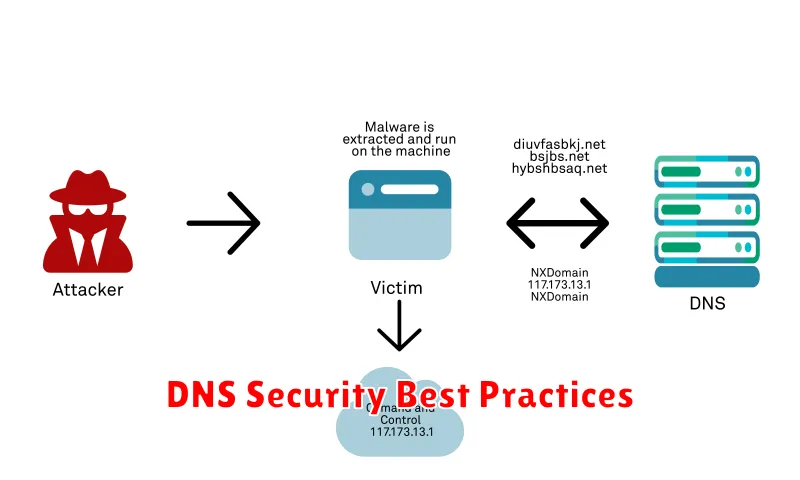
Implementing robust DNS security measures is crucial for protecting your cloud infrastructure. DNSSEC (Domain Name System Security Extensions) adds a layer of authentication to DNS records, preventing DNS spoofing and cache poisoning attacks. Enabling DNSSEC ensures that users are directed to the legitimate server.
Regularly monitoring DNS queries can help identify unusual activity that may indicate an attack. Implement query rate limiting to mitigate DDoS attacks targeting your DNS servers. This limits the number of queries a client can make within a specific timeframe.
Utilize redundant DNS servers. Having secondary DNS servers ensures continuous availability even if the primary server fails. This redundancy enhances resilience against attacks and outages.
Common DNS Issues and Fixes
DNS issues can disrupt website access and other online services. Some common problems include DNS resolution failures, slow DNS propagation, and DNS hijacking.
DNS resolution failures occur when a domain name cannot be translated to its corresponding IP address. This often manifests as an error message like “server not found.” Fixes include flushing the DNS cache, changing DNS servers, or checking for typos in the domain name.
Slow DNS propagation is the delay between updating DNS records and those changes becoming globally visible. There’s no immediate fix, as it requires time for the changes to propagate across the internet. Patience is key, though confirming the correct configuration with your DNS provider is advisable.
DNS hijacking is a malicious attack where DNS records are altered, redirecting users to fraudulent websites. Implementing robust security measures with your DNS provider, like DNSSEC, helps mitigate this threat.
